Sunday, October 20, 2019

How to Install Bootstrap for Angular 6? Explain it.


We will be using Bootstrap for styling. Install bootstrap using the following NPM command
npm install bootstrap@3 jquery --save


This installs Bootstrap in the node_modules folder. If you do not find the bootstrap folder in node_modules folder, restart visual studio code and you will find it. You can also execute the following command in the integrated terminal window and search for bootstrap folder.
dir node_modules

In Angular CLI configuration file include the path to the Bootstrap CSS file in the styles array. Remember in Angular 6, the Angular CLI configuration file is renamed to angular.json from angular-cli.json.


"styles": [
  "src/styles.css",
  "node_modules/bootstrap/dist/css/bootstrap.min.css"
]


Bootstrap relies on jQuery for some of it's features. If you plan on using those features, please include the path to jQuery and Bootstrap jQuery files in the scripts array in angular.json file.


"scripts": [
  "node_modules/jquery/dist/jquery.min.js",
  "node_modules/bootstrap/dist/js/bootstrap.min.js"
]


To verify that you have the correct paths specified, you can request the respective files by running the angular project and pointing your browser to http://localhost:4200/node_modules/bootstrap/dist/css/bootstrap.min.css

A quick additional test to verify, Bootstrap styles work as expected, include the following button in the root component (app.component.html) file.


<button class="btn btn-primary">
    Bootstrap Styled Button
</button>

Creating angular 6 project

This is Part 1 of Angular 6 Tutorial for beginners. 
  • We will set up the development environment by installing the tools required for Angular 6 development
  • Create a brand new Angular 6 project using Angular CLI


Pre-requisites

Basic knowledge of Angular and Angular CLI

If you are new to Angular, please check out our 
Angular 2 course and Angular CRUD course

If you are new to Angular CLI, please check out our 
Angular CLI course

Setting up Angular 6 Development environment

Step 1 : Install Node and NPM using the link below. 
https://nodejs.org/en/download/

You need Node version 8.x or greater and NPM version 5.x or greater. To veriify the version of NODE and NPM you have, execute the following 2 commands using the command prompt window. Make sure you are running the command prompt as an administrator.
node -v
npm -v

If you already have NODE and NPM installed and if you want to upgrade to the latest version simply download and run the installer again, and it will automatically update NODE and NPM to the latest version.

Step 2 : Install Angular CLI. It is a command line tool that help us create angular applications quickly and easily while still following angular's best practices and conventions. It's a great tool to increase your productivity as an angular developer.

If you do not have Angular CLI installed already, execute the following command and it will install the latest version.
npm install -g @angular/cli

If you already have Angular CLI installed, and you want to upgrade to the latest version, then execute the following command
npm install -g @angular/cli@latest

Step 3 : Download and install Visual Studio Code
https://code.visualstudio.com/download

Create a new Angular 6 project using the Angular CLI : 

Step 1 : Run the command prompt window as an administrator

Step 2 : Execute the following command to create a new Angular 6 project.
ng new Angular6Project -d

Command Explanation
ngIs the Angular CLI
newFor generating a new project
Angular6ProjectIs the name of the project
-dThis is dry-run flag. This flag instructs Angular CLI just to list the files it's going to create. It does not actually create them. This is a great option, because it lets us see what files will be generated without actually generating them.

In our case, we do not want test files to be generated so let's also use --skip-tests option to skip generating test files. The following generates a new Angular 6 project and all the required files. Notice, we have not used -d option, so Angular CLI will create the Angular project and all the required files.
ng new Angular6Project --skip-tests

Running the Angular 6 Project

Step 1 : In the command prompt window, use the following command to go to the project directory
cd Angular6Project

Step 2 : Execute the following command to run the Angular 6 project. This command builds, launches your default browser and serves the application using the default port number 4200 (http://localhost:4200/)
ng serve --open (short cut command : ng s -o)

At this point you will see the following on the browser
Welcome to Angular6Project!

This message is coming from the root component AppComponent.

The project structure and the files in angular project have not changed much between Angular 5 and Angular 6. One change I can point out at this time is the Angular CLI configuration file. Prior to Angular 6, the Angular CLI configuration file is called angular-cli.json. In Angular 6, it is renamed to just angular.json. It's not a simple rename, the file format is also slightly different.

In the generated project there are several files and folders. If you are new to these files and folders, please check out Parts 7 and 8 from Angular CLI tutorial. 

The src folder contains the angular application components, templates, services, styles, images, and anything else the application needs. The files outside of this folder are meant to support building, testing, maintaining, documenting, and deploying the angular application.

To confirm this Angular application is using Angular Version 6, open package.json file and notice all the Angular packages version is 6.1.0.

Sunday, October 13, 2019

C# Coding Questions For Technical Interviews

Q.1: How to reverse a string?

Ans.: The user will input a string and the method should return the reverse of that string
  • input: hello, output: olleh
  • input: hello world, output: dlrow olleh
internal static void ReverseString(string str)  
{  
      
    char[] charArray = str.ToCharArray();  
    for (int i = 0, j = str.Length - 1; i < j; i++, j--)  
    {  
        charArray[i] = str[j];  
        charArray[j] = str[i];  
    }  
    string reversedstring = new string(charArray);  
    Console.WriteLine(reversedstring);  
} 

Q.2: How to find if the given string is a palindrome or not?

Ans.: The user will input a string and we need to print “Palindrome” or “Not Palindrome” based on whether the input string is a palindrome or not.
  • input: madam, output: Palindrome
  • input: step on no pets, output: Palindrome
  • input: book, output: Not Palindrome
if we pass an integer as string parameter then also this method will give the correct output
  • input: 1221, output: Palindrome
internal static void chkPalindrome(string str)  
 {  
     bool flag = false;  
     for (int i = 0, j = str.Length - 1; i < str.Length / 2; i++, j--)  
     {  
         if (str[i] != str[j])  
         {  
             flag = false;  
             break;  
         }  
         else  
             flag = true;  
     }  
     if (flag)  
     {  
         Console.WriteLine("Palindrome");  
     }  
     else  
         Console.WriteLine("Not Palindrome");  
 }  

Q.3: How to reverse the order of words in a given string?

Ans.: The user will input a sentence and we need to reverse the sequence of words in the sentence.
  • input: Welcome to Csharp corner, output: corner Csharp to Welcome
internal static void ReverseWordOrder(string str)  
{  
    int i;  
    StringBuilder reverseSentence = new StringBuilder();  
  
    int Start = str.Length - 1;  
    int End = str.Length - 1;  
  
    while (Start > 0)  
    {  
        if (str[Start] == ' ')  
        {  
            i = Start + 1;  
            while (i <= End)  
            {  
                reverseSentence.Append(str[i]);  
                i++;  
            }  
            reverseSentence.Append(' ');  
            End = Start - 1;  
        }  
        Start--;  
    }  
  
    for (i = 0; i <= End; i++)  
    {  
        reverseSentence.Append(str[i]);  
    }  
    Console.WriteLine(reverseSentence.ToString());  
}  

Q.4: How to reverse each word in a given string?

Ans.: The user will input a sentence and we need to reverse each word individually without changing its position in the sentence.
  • input: Welcome to Csharp corner, output: emocleW ot prahsC renroc
internal static void ReverseWords(string str)  
 {  
     StringBuilder output = new StringBuilder();  
     List<char> charlist = new List<char>();  
  
     for (int i = 0; i < str.Length; i++)  
     {  
         if (str[i] == ' ' || i == str.Length - 1)  
         {  
             if (i == str.Length - 1)  
                 charlist.Add(str[i]);  
             for (int j = charlist.Count - 1; j >= 0; j--)  
                 output.Append(charlist[j]);  
  
             output.Append(' ');  
             charlist = new List<char>();  
         }  
         else  
             charlist.Add(str[i]);  
     }  
     Console.WriteLine(output.ToString());  
 }  

Q.5: How to count the occurrence of each character in a string?

Ans.: The user will input a string and we need to find the count of each character of the string and display it on console. We won’t be counting space character.
  • input: hello world;
 output: h – 1
 e – 1
 l – 3
 o – 2
 w – 1
 r – 1
 d – 1
internal static void Countcharacter(string str)  
{  
    Dictionary<char, int> characterCount = new Dictionary<char, int>();  
  
    foreach (var character in str)  
    {  
        if (character != ' ')  
        {  
            if (!characterCount.ContainsKey(character))  
            {  
                characterCount.Add(character, 1);  
            }  
            else  
            {  
                characterCount[character]++;  
            }  
        }  
  
    }  
    foreach (var character in characterCount)  
    {  
        Console.WriteLine("{0} - {1}", character.Key, character.Value);  
    }  
}  

Q.6: How to remove duplicate characters from a string?

Ans.: The user will input a string and the method should remove multiple occurrences of characters in the string
  • input: csharpcorner, output: csharpone
internal static void removeduplicate(string str)  
 {  
     string result = string.Empty;  
  
     for (int i = 0; i < str.Length; i++)  
     {  
         if (!result.Contains(str[i]))  
         {  
             result += str[i];  
         }  
     }  
     Console.WriteLine(result);  
 }  

Q.7: How to find all possible substring of a given string?

Ans.: This is a very frequent interview question. Here we need to form all the possible substrings from input string, varying from length 1 to the input string length. The output will include the input string also.
  • input: abcd , output : a ab abc abcd b bc bcd c cd d
internal static void findallsubstring(string str)  
 {  
     for (int i = 0; i < str.Length; ++i)  
     {  
         StringBuilder subString = new StringBuilder(str.Length - i);  
         for (int j = i; j < str.Length; ++j)  
         {  
             subString.Append(str[j]);  
             Console.Write(subString + " ");  
         }  
     }  
 }

Q.8: How to perform Left circular rotation of an array?

Ans.: The user will input an integer array and the method should shift each element of input array to its Left by one position in circular fashion. The logic is to iterate loop from Length-1 to 0 and swap each element with last element.
  • input: 1 2 3 4 5, output: 2 3 4 5 1
internal static void RotateLeft(int[] array)  
 {  
     int size = array.Length;  
     int temp;  
     for (int j = size - 1; j > 0; j--)  
     {  
         temp = array[size - 1];  
         array[array.Length - 1] = array[j - 1];  
         array[j - 1] = temp;  
     }  
  
     foreach (int num in array)  
     {  
         Console.Write(num + " ");  
     }  
 }

Q.9: How to perform Right circular rotation of an array?

Ans: The user will input an integer array and the method should shift each element of input array to its Right by one position in circular fashion. The logic is to iterate loop from 0 to Length-1 and swap each element with first element
  • input: 1 2 3 4 5, output: 5 1 2 3 4
internal static void RotateRight(int[] array)  
{  
    int size = array.Length;  
    int temp;  
    for (int j = 0; j < size - 1; j++)  
    {  
        temp = array[0];  
        array[0] = array[j + 1];  
        array[j + 1] = temp;  
    }  
    foreach (int num in array)  
    {  
        Console.Write(num + " ");  
    }  
} 

Q.10: How to find if a positive integer is a prime number or not?

Ans.: The user will input a positive integer and the method should output “Prime” or “Not Prime” based on whether the input integer is a prime number or not.
The logic is to find a positive integer less than or equal to the square root of input integer. If there is a divisor of number that is less than the square root of number, then there will be a divisor of number that is greater than square root of number. Hence, we have to traverse till the square root of number.
The time complexity of this function is O(√N) because we traverse from 1 to √N.
  • input: 20, output: Not Prime
  • input: 17, output: Prime
static void Main(string[] args)  
  {  
      if (FindPrime(47))  
      {  
          Console.WriteLine("Prime");  
      }  
      else  
      {  
          Console.WriteLine("Not Prime");  
      }  
      Console.ReadLine();  
  }    
  
internal static bool FindPrime(int number)  
  {  
      if (number == 1) return false;  
      if (number == 2) return true;  
      if (number % 2 == 0) return false;  
  
      var squareRoot = (int)Math.Floor(Math.Sqrt(number));  
  
      for (int i = 3; i <= squareRoot; i += 2)  
      {  
          if (number % i == 0) return false;  
      }  
  
      return true;  
  }  

Q.11: How to find the sum of digits of a positive integer?

Ans.: The user will input a positive integer and the method should return the sum of all the digits in that integer.
  • input: 168, output: 15
internal static void SumOfDigits(int num)  
{  
    int sum = 0;  
    while (num > 0)  
    {  
        sum += num % 10;  
        num /= 10;  
    }  
    Console.WriteLine(sum);  
}  

Q.12: How to find second largest integer in an array using only one loop?

Ans.: The user will input an unsorted integer array and the method should find the second largest integer in the array.
  • input: 3 2 1 5 4, output: 4
internal static void FindSecondLargeInArray(int[] arr)  
{  
    int max1 = int.MinValue;  
    int max2 = int.MinValue;  

    foreach (int i in arr)  
    {  
        if (i > max1)  
        {  
            max2 = max1;  
            max1 = i;  
        }  
        else if (i > max2)  
        {  
            max2 = i;  
        }  
    }  
    Console.WriteLine(max2); ;  
} 

Q.13: How to find third largest integer in an array using only one loop?

Ans.: The user will input an unsorted integer array and the method should find the third largest integer in the array.
  • input: 3 2 1 5 4, output: 3
internal static void FindthirdLargeInArray(int[] arr)    
{    
    int max1 = int.MinValue;    
    int max2 = int.MinValue;    
    int max3 = int.MinValue;    
  
    foreach (int i in arr)    
    {    
        if (i > max1)    
        {    
            max3 = max2;    
            max2 = max1;    
            max1 = i;    
        }    
        else if (i > max2)    
        {    
            max3 = max2;    
            max2 = i;    
        }    
        else if (i > max3)    
        {    
            max3 = i;    
        }    
    }    
    Console.WriteLine(max3); ;    
}   

Q.14: How to convert a two-dimensional array to a one-dimensional array?

Ans.: The user will input a 2-D array (matrix) and we need to convert it to a 1-D array. We will create 1-D array column wise.
  • input: { { 1, 2, 3 }, { 4, 5, 6 } }, output: 1 4 2 5 3 6
internal static void MultiToSingle(int[,] array)  
{  
    int index = 0;  
    int width = array.GetLength(0);  
    int height = array.GetLength(1);  
    int[] single = new int[width * height];  

    for (int y = 0; y < height; y++)  
    {  
        for (int x = 0; x < width; x++)  
        {  
            single[index] = array[x, y];  
            Console.Write(single[index] + " ");  
            index++;  
        }  
    }  
} 
This question can also be asked to form 1-D array row wise. In this case just swap the sequence of thefor loops as below. The output will be 1 2 3 4 5 6 for the input matrix mentioned above.
for (int x = 0; x < width; x++ )    
 {    
     for ( int y = 0; y < height; y++)    
     {    
         single[index] = array[x, y];    
         Console.Write(single[index] + " ");    
         index++;    
     }    
 }

Q.15: How to convert a one-dimensional array to a two-dimensional array?

Ans.: The user will input 1-D array along with the number of rows and columns. The method should convert this 1-D array to a 2-D array(matrix) of given row and column. We will create matrix row wise.
  •  input: {1, 2, 3, 4, 5, 6} ,2 ,3
 output: 1 2 3
 4 5 6
internal static void SingleToMulti(int[] array, int row, int column)  
 {  
     int index = 0;  
     int[,] multi = new int[row, column];  
  
     for (int y = 0; y < row; y++)  
     {  
         for (int x = 0; x < column; x++)  
         {  
             multi[y, x] = array[index];  
             index++;  
             Console.Write(multi[y, x] + " ");  
         }  
         Console.WriteLine();  
     }  
 }  

Q.16: How to find the angle between hour and minute hands of a clock at any given time?

Ans.: The user will input hour and minute of the time and the method should give the angle between the hour hand and minute hand at that given time.
  • input: 9 30, output: The angle between hour hand and minute hand is 105 degrees
  • input: 13 30, output: The angle between hour hand and minute hand is 135 degrees
The logic is to find the difference in the angle of hour and minute hand from the position of 12 O Clock, when angle between them is zero. Each hour on the clock represent an angle of 30 degrees (360 divided by 12). Similarly, each minute on the clock will represent an angle of 6 degrees (360 divided by 60) and the angle for an hour will increase as the minutes for that hour increases. So, our code will be
internal static void FindAngleinTime(int hours, int mins)      
 {      
     double hourDegrees = (hours * 30) + (mins * 30.0 / 60);      
     double minuteDegrees = mins * 6;      
    
     double diff = Math.Abs(hourDegrees - minuteDegrees);      
    
     if (diff > 180)      
     {      
         diff = 360 - diff;      
     }      
    
     Console.WriteLine("The angle between hour hand and minute hand is {0} degrees", diff);      
 }  

Introduction to Hadoop Distributed File System

Hadoop File System was mainly developed for using distributed file system design. It is highly fault tolerant and holds huge amount of data sets and provides ease of access. The files are stored across multiple machines in a systematic order. These stored files are stored to eliminate all possible data losses in case of failure and helps make applications available for parallel processing. This file System is designed for storing very large amount of files with streaming data access.
HDFS is based on the Google File System (GFS) and written completely in Java programming language. Google provided only a white paper, without any implementation. Around 90 percent of the GFS architecture has been implementation in the form of HDFS.
HDFS was originally built and developed as a storage infrastructure for the Apache Nutch web search engine project. It was initially known as the Nutch Distributed File System (NDFS).

Assumptions and Goals

Hardware Failure

Hardware failure is basically the norm instead of exception. An HDFS instance consists of hundreds or thousands of server machines, each consuming the storing part of the file system’s data. The real fact is that there are a large number of components and that each component consists of non-trivial probability of failure which explains that some of the component of HDFS is always non-functional. Therefore, detection of faults is quick, automatic recovery from them is the main core architectural motto of HDFS.

Streaming Data Access

Applications that run on HDFS need streaming access to every individual data set. They are not meant for general purpose applications that typically run on general purpose file systems. HDFS is designed more for batch processing instead of interactive use by End-users. The emphasis is on high streams throughput of data access rather than low latency of data access. POSIX consists of many hard requirements which are not required for applications which come under HDFS. POSIX semantics are trending huge success in certain key areas to increase data throughput rates.

Large Data Sets

Applications that run on HDFS have massively large data sets. A typical file in HDFS ranging from gigabytes to terabytes in size. Thus, HDFS are built in such a way that it supports large files. It provides high aggregate data bandwidth and scale measuring hundreds of nodes in a single cluster. It should access to tons of millions of files at a same time.

Simple Coherency Model

HDFS applications need write-once-read-many access model for files. A file once created, written, and closed need not be changed later. This assumption helps to simplify the data coherency issues and enables us the high throughput data access. A MapReduce application or a web crawler application is perfectly fitted in this model. In future new innovative ideas been implemented to support appending-writes to files in the future.

“Moving Computation is Cheaper than Moving Data”

A computation requested by an application is very more efficient when executed near its operated data. This is termed true when there is huge amount data set. This results in minimization of network congestion and increases the overall throughput of the system. The assumption will implies better if you migrate the computation to the closer data location rather than moving the data to where the application is running. HDFS provides interfaces for applications to move closely among themselves where exactly the data is being located.

Portability across Heterogeneous Hardware and Software Platforms

HDFS has been designed in such a way for easy transport from one platform to another. This facilitates of HDFS as a platform of choice for a large set of applications.

Features of HDFS

  • Usage of distributed storage and processing.
  • Optimization is used for throughput over latency.
  • Efficient in reading large files but poor at seek requests for many small ones.
  • A command interface to interact with HDFS is provided.
  • The built-in servers of data node and name node helps the end users to check the cluster‘s status as per time intervals.
  • Streams access the data of file system.
  • Authentication of file permissions and authentication are provided.
  • Uses replication are used instead of handling disk failures. Each blocks comprises a file storage on several nodes inside the cluster and the HDFS NameNode continuously keep monitoring the reports which are sent by every DataNode to ensure due to failures no block have gone below the desired replication factor. If this this happens then it schedules the addition of another copy within the cluster.

Why HDFS works very well with Big Data?

  • HDFS uses the MapReduce method for access to data which is very fast
  • It follows a data coherency model that is simple to implement still highly robust and scalable
  • Compatible with any kind commodity hardware and operating system processor.
  • Economy is been achieved by distributing data and processing on clusters with parallel nodes
  • Data is always safe as it is automatically saved in multiple locations for safe secure.
  • It provides a JAVA API’s and C language is on the top priority.
  • It is easily accessible using a web browser making it highly utilitarian.

HDFS Architecture

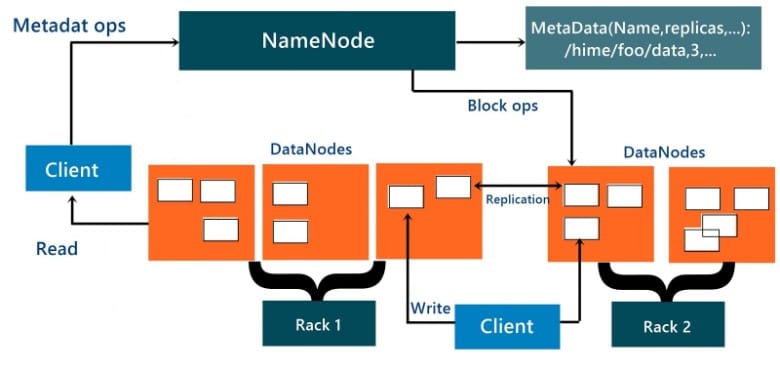
It uses mainly the master slave architecture and contains the following elements:

Namenode and DataNode

The namenode is the commodity hardware that contains the GNU/Linux operating system and its library file setup and the namenode software. The system containing namenode acts as the master server and carries out following tasks:
  • Manage namespace for file system.
  • Provides client’s access to files.
  • Execution of file system operations such as rename, open and close files and directories.
  • There are a number of Data Nodes consists of one per node in the cluster, which helps to manage storage attached to the nodes that they run on.
  • HDFS exposes a file system namespace and provides access to user data to be stored within files.
  • Basically a file is split into one or more blocks and these blocks are stored in a set of DataNodes.
  • The NameNode executes file system namespace operations containing opening, closing, and renaming files and directories which determine the mapping of blocks to DataNodes which is responsible for providing read and write requests from the file system’s clients.
  • The DataNodes also perform functions such as block creation, deletion, and replication upon instruction from the NameNode.
  • These machines typically run a GNU/Linux operating system (OS).
  • As we know HDFS is designed and implemented based on Java language; any machine that supports Java application can run the NameNode or the DataNode software.
  • HDFS can be deployed on a wide range of machines as the usage of it is highly portable in Java language. A particular deployment has a dedicated machine that runs only the NameNode software. The other machines in the cluster run one instance of the DataNode software only.
  • The architecture does not predicate based on running multiple DataNodes on the same machine but in a real deployment that is rarely happened.
The single NameNode in a cluster efficiently simplifies the architecture of the system. The NameNode is the main arbitrator and repository for all HDFS metadata sets. The system is designed in such a way that user data never flows through the NameNode.

Block

Data is mainly stored in HDFS’s file. These files are segregated into one or more segments and further stored in individual data node. These file segments are namely known as block. The default block size is 64MB which can be modified as per the requirements from HDFS configuration.
HDFS blocks are huge compared to disk blocks and the main reason is cost reduction. By making a particular set of block large enough hence here the time consumed to transfer the data from the disk can be made larger than the time to seek from the beginning of the block. Thus the time consumed to transfer a large file made of multiple blocks operates at the disk transfer rate.

HDFS Objectives

  • Fault detection and recovery: It provide methods for fast and automatic fault detection and recovery of data.
  • Huge datasets: It consists of multiple nodes per cluster to manage the applications with large amount of datasets.
  • Hardware at data: HDFS reduces the network traffic and increases the throughput as per the required time intervals.

HDFS High Availability

  • HDFS provides features such t recovery is possible in terms of failed namenode by adding support for HDFS high availability (HA).
  • A pair of namenodes in an active stands by configuration to take over its duties to continue servicing client requests without any interruption.
The above points can be achieved through following implementations:
  • Using highly available shared storage document and to share the edit log.
  • Confirming that the DataNodes send block reports to both NameNodes
  • Clients must be configured such that it can handle namenode failover

HDFS File Permissions

HDFS has a permissions model accessing the files and directories.
There are three types of permission:
  • Read permission (r)
  • Write permission (w)
  • Execute permission (x)
  • The read permission is used to read files or list the contents of files of a directory.
  • The write permission is used to write a file, or for a directory, to create or delete files or directories.
  • The execute permission is ignored for a file since we can’t execute a file on HDFS, and for a directory you have to access its children.
  • Each file and directory has an owner, a group, and a mode within it.
The mode is given the permissions for the user who is the owner, the permissions is given for the users who are members of the group, and the permissions is given for users who are neither the owners nor members of the group.

Hadoop Ecosystem
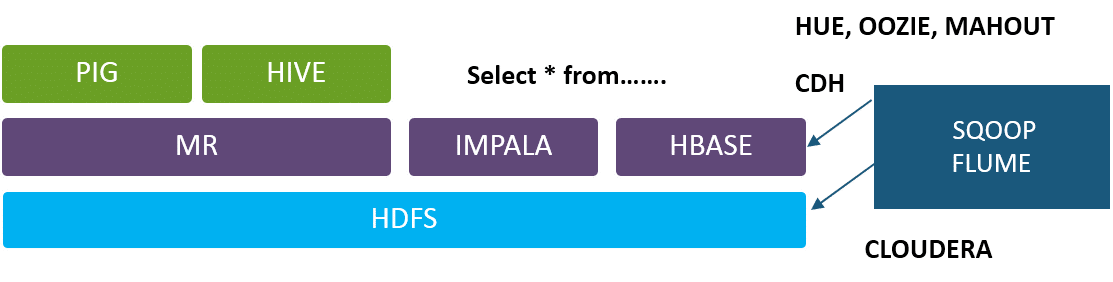
  • HDFS is the file system of Hadoop
  • MR is the job which runs basically on file system
  • The MR Job guide the user to ask question from HDFS files
  • Pig and Hive are two projects built so that you can replace coding based on map reduce.
  • Pig and Hive interpreter converts the script and SQL queries “INTO” MR Job
  • To save the document on MapReduce only dependency for querying on HDFS will be Impala and Hive
  • Impala Optimized for high latency queries are based on real time applications.
  • Hive is optimized for batch processing jobs.
  • Sqoop: Can put data from a relation DB to Hadoop ecosystem
  • Flume sends the data generated from external system to move towards the HDFS to adapt for high volume logging.
  • Hue: Cluster based on Graphical frontend
  • Oozie: It is an workflow management tool
  • Mahout : Machine learning Library files.
  • When a 150 mb file is being implemented forcibly Hadoop ecosystem break itself into multiple parts to achieve parallelism.
  •  It breaks itself into smaller units where default unit size is 64 mb
  •  Data node is the demon which takes care of all welfares happening on individual node
  •  Name node keeps track on all aspects from when and where required and how to collect the same group together.

Consider the following Problems:

  • If one of the nodes fails, then the data stored goes missing at that node
  • Network Failure issues.
  • Single Point of Failure: Name Node which is the Heart of Hadoop ecosystem

Solution:

  • Hadoop solves this problem by duplicating each and every data fragment thrice and save it on different nodes, so that even if one node fails, we can still recover the data.
  • Network Failure is an important issue as lot of shuffle happens in the day to day activity.
  • Name node failure was reduced initially by storing the name node data on NFS (Network file Server) which is been recovered in case of Name node crash.

HDFS Installation and Shell Commands

Setting up of the Hadoop cluster:
Successfully installation of Hadoop and configure them so that the clusters ranging from couple of nodes to even tens of thousands over huge amount of clusters. For this, first you need to install Hadoop on a single machine and it requires compulsory of installing Java if this doesn’t exist in your system.
Getting Hadoop to work on the entire cluster involves required software on all the machines that are tied up with the cluster. As per the norms one of the machines is associated with the Name Node and another associated with the Resource Manager. The other services like The MapReduce Job History and the Web App Proxy Server usually hosted on specific machines or even on shared resources are loaded as per the requirement of the task.  Rest all the nodes in cluster have a dual nature of both the Node Manager and the Data Node. These are collectively termed as the slave nodes.
Hadoop to work in the non-secure mode
The Java configuration of Hadoop has two important files:
  • Read-only are the default configuration such as -core-default.xml, hdfs-default.xml, yarn-default.xml and mapred-default.xml.
  • Site-specific configuration based on -etc/hadoop/core-site.xml, etc/hadoop/hdfs-site.xml, etc/hadoop/yarn-site.xml and etc/hadoop/mapred-site.xml.
Possible to manage the Hadoop scripts in the bin/ directory distribution, by setting site-specific values by the following storage files etc/hadoop/hadoop-env.sh and etc/hadoop/yarn-env.sh.
For the Hadoop cluster configuration you first create the ecosystem where the Hadoop daemons can execute and also requires the parameters for configuration.
The various daemons of Hadoop Distributed File System are listed below:
  • Node Manager
  • Resource Manager
  • WebApp Proxy
  • NameNode
  • Secondary NameNode
  • DataNode
  • YARN daemons
The Hadoop Daemons configuration environment
To get the Hadoop daemons’ access the right site with specific customization where the administrators need to use the following commands the etc/hadoop/hadoop-env.sh or the etc/hadoop/mapred-env.sh and etc/hadoop/yarn-env.sh scripts. The JAVA_HOME are specified properly such that it is defined in properly on every remote node.

Configuration of the individual daemons

The list of Daemons with their relevant environment variable
NameNode –HADOOP_NAMENODE_OPTS
DataNode – HADOOP_DATANODE_OPTS
Secondary NameNode – HADOOP_SECONDARYNAMENODE_OPTS
Resource Manager – YARN_RESOURCEMANAGER_OPTS
Node Manager – YARN_NODEMANAGER_OPTS
WebAppProxy – YARN_PROXYSERVER_OPTS
Map Reduce Job History Server – HADOOP_JOB_HISTORYSERVER_OPTS
Other related important Customization configuration parameters:
  • HADOOP_PID_DIR – the process ID files of the daemons is contained in this directory.
  • HADOOP_LOG_DIR – the log files of the daemons are stored in this directory.
  • HADOOP_HEAPSIZE / YARN_HEAPSIZE – the heap size is measured in terms of MB’s and if you own an variable that is set to 1000 then automatically the heap is also set to 1000 MB. And by default it is set as 1000

The HDFS Shell Commands

The important operations of Hadoop Distributed File System using the shell commands used for file management in the cluster.
  • Directory creation in HDFS for a specific given path are given as.
hadoopfs-mkdir<paths>
Example:
hadoopfs-mkdir/user/saurzcode/dir1/user/saurzcode/dir2
  • Listing of the directory contents.
hadoopfs-ls<args>
Example:
hadoopfs-ls/user/saurzcode
  • HDFS file Upload/download.
Upload:
hadoopfs -put:
Copy single source file, or multiple source files based on local file system to the Hadoop data file system
hadoopfs-put<localsrc> … <HDFS_dest_Path>
Example:
hadoopfs-put/home/saurzcode/Samplefile.txt/user/saurzcode/dir3/
Download:
hadoopfs -get:
Copies or downloads the files to the local file system
hadoopfs-get<hdfs_src><localdst>
Example:
hadoopfs-get/user/saurzcode/dir3/Samplefile.txt/home/
  • Viewing of file content
Same as Unix cat command:
hadoopfs-cat<path[filename]>
Example:
hadoopfs-cat/user/saurzcode/dir1/abc.txt
  • File copying from source to destination
hadoopfs-cp<source><dest>
Example:
hadoopfs-cp/user/saurzcode/dir1/abc.txt/user/saurzcode/dir2
  • Copying of file to HDFS from a local file and vice-versa
Copy the address from the LocalHost:
hadoopfs-copyFromLocal<localsrc>URI
Example:
hadoopfs-copyFromLocal/home/saurzcode/abc.txt/user/saurzcode/abc.txt
copyToLocal host
Usage:
hadoopfs-copyToLocal [-ignorecrc] [-crc] URI<localdst>
  • File moving from source to destination.
But remember, you cannot move files across filesystem.
hadoopfs-mv<src><dest>
Example:
hadoopfs-mv/user/saurzcode/dir1/abc.txt/user/saurzcode/dir2
  • File or directory removal in HDFS.
hadoopfs-rm<arg>
Example:
hadoopfs-rm/user/saurzcode/dir1/abc.txt
Repetitive version of delete.
hadoopfs-rmr<arg>
Example:
hadoopfs-rmr/user/saurzcode/
  • Showing the file’s final few lines.
hadoopfs-tail<path[filename]>
Example:
hadoopfs-tail/user/saurzcode/dir1/abc.txt
  • Showing the aggregate length of a file.
hadoopfs-du<path>
Example:
hadoopfs-du/user/saurzcode/dir1/abc.txt


How to register multiple implementations of the same interface in Asp.Net Core?

 Problem: I have services that are derived from the same interface. public interface IService { } public class ServiceA : IService { ...